p
Start
1
Introduction
2
Functionalities
b
You earned a Badge!

^
Intermediate
Miro is an online whiteboard, which is actually very multifaceted. You may already know that a whiteboard can be very helpful for working in teams or project groups. Here you learn how to collaborate with your teams in real time, but also in an asynchronous way. Whether for brainstorming, project management or meetings, you can use Miro in various ways. On the whiteboard, you can make drawings, add virtual post-its, draw shapes and arrows, and so much more.
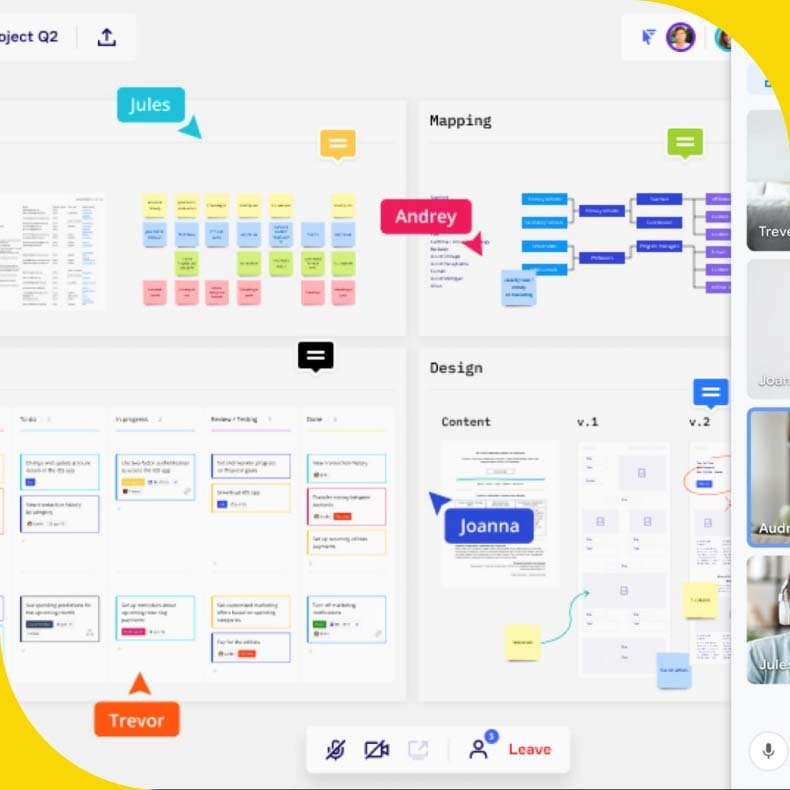
Let's Start with the Functionalities!
1
Connection to Google
Use pre-built templates or create own templates and smart frameworks with an infinite canvas.
2
Many templates
There are many pre-designed boards that you can simply use as a template.
3
Active collaboration
Miro can be easily shared with others, which don’t need to create an account. And you can see who’s actively working on the board.
How it works?
Here you have some tutorials to learn how to use the tool.



Learn More!
Here you have other resources to learn more about Miro. You can find documments as guides, tips, extra tools.
Practice your skills
Let's say you and your colleagues are working in different locations. However, an important online course is coming up that needs to be planned and coordinated among you all. So you decide to use Miro and set up an online whiteboard. You invite your colleagues to work on the same whiteboard at the same time. In addition to writing down various topics, you also collect links and photos that are helpful to visualize the content of the course.
Competences
Project and operations management; Teamwork; Creativity
Do the test &
earn your badge!
Do the test and prove the skills you've learned and earn your digital badge.
Which are the main
functionalities in
Miro?
Connection to Google
Many templates
Active collaboration